
How to Change Your SRD Phone Number
Lost your phone or got a new number? This guide provides a clear, visual walkthrough of the official SASSA process to change your SRD phone number online.
Start the Step-by-Step GuideKeeping your contact details up to date with SASSA is essential for receiving important communications about your SRD grant. If you have a new cellphone number, you must complete the srd change number process on the official website. This guide will show you exactly how to do it safely and correctly.
Before You Start: Important Information
To ensure you can successfully change your SRD phone number, have the following ready:
- Your 13-digit South African ID number.
- Access to a smartphone or device with a working camera for the facial recognition step.
- This process is for updating your contact details only, not for submitting a new application.
Advertisement
How to Complete the SRD Change Cellphone Number Online Process
Follow this official, foolproof guide to update your contact details correctly.
Go to the Official SASSA Update Portal
Navigate directly to the official SASSA SRD contact update website by visiting this link: srd.sassa.gov.za/said. Then scroll down to “How can I change my Mobile details” and click on the link shown below.
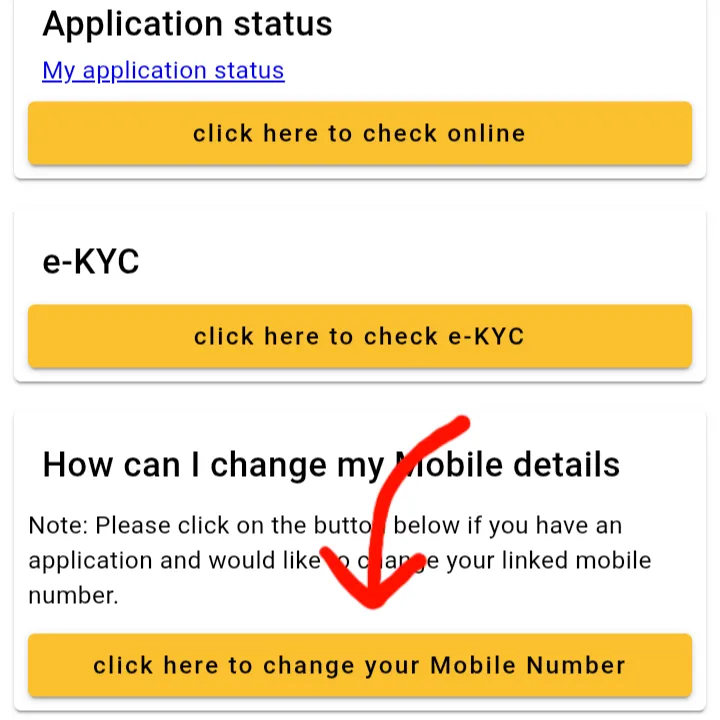
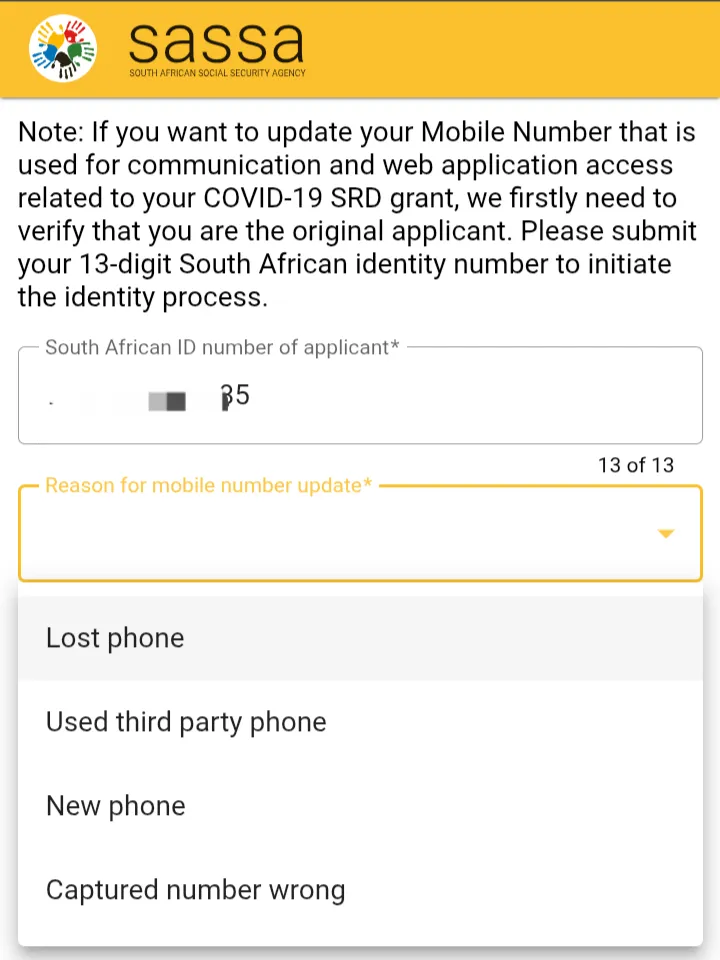
Enter Your ID and Reason for Changing Cell Phone Number
On this page, you must provide your South African ID Number. Then, from the dropdown menu, choose the reason you need to change your number. The options are:
- Lost phone
- Used third party phone
- New phone
- Captured number wrong
Once you have selected your reason, click “Submit”.
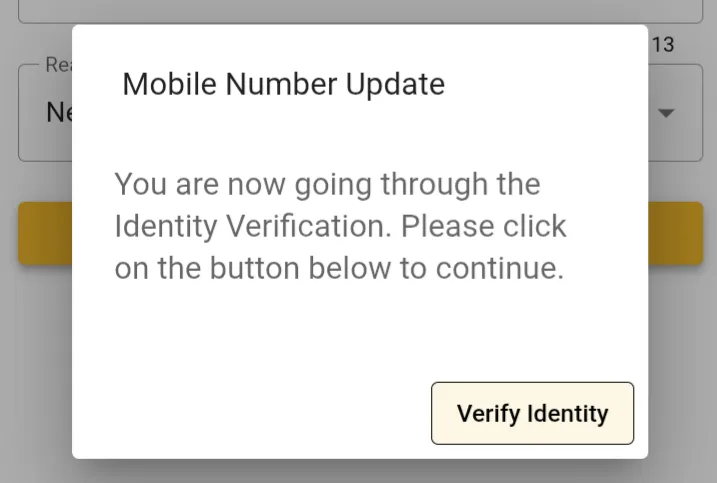
Begin Identity Verification
A pop-up window will appear asking you to verify your identity. This is a crucial security step. Click “Verify Identity” and follow the on-screen instructions.
Enter and Verify Your New Number
After you successfully pass the identity verification, you will be redirected to a new page. Here, you can carefully enter your new cellphone number. SASSA will then send a One Time Pin (OTP) to this new number to confirm that you are the owner. Enter the OTP to complete the srd change number process.
Finished the Guide? Update Your Number.
You have the knowledge. Now you can change your number with confidence on the official website.
Go to Official Update SiteAfter Changing Your Number
Now that your contact details are updated, it’s a good time to check your application status to ensure everything is in order. Use our guide to perform a quick and safe status check.
Perform an SRD Status CheckAdvertisement
Frequently Asked Questions (FAQ)
How long does it take for the new number to be updated?
The update is usually instant after you successfully verify your new number with the OTP. You can try to perform an SRD status check with your new number shortly after to confirm the change was successful.
Why do I need to do a facial recognition scan?
The facial recognition step is a critical security measure to prevent fraud. It ensures that only the true owner of the grant application can make changes to sensitive information like a phone number, protecting your grant from being stolen.
What if I don’t have a camera for the identity verification?
If you do not have a device with a camera (like a modern smartphone), you will not be able to complete the SASSA SRD change phone number process online. You will need to borrow a smartphone or visit your nearest SASSA office for assistance.
